Yep, just like we all need a hole in the head, I'm starting an augmented reality blog. The augmented reality stuff doesn't really fit; well nothing really fits in this curmudgeonly hodgepodge of technology, geospatial, and occasional cello posts.
I've been hoarding the locativemedia.org domain for years, so it's time to put it to good use. With out further ado: Locatively
Friday, May 28, 2010


Saturday, May 22, 2010
HTC EVO 4G Unboxing
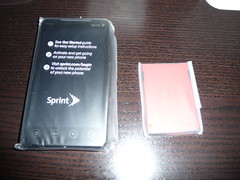
Sprint and Google generously gave attendees of of Google I/O 2010 a HTC EVO 4G smartphone.
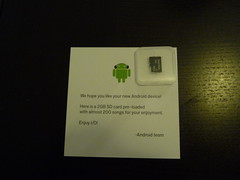
100% recyclable tofu style packaging and a 2GB SD card with 200 songs including Blue Oyster Cult's Godzilla!
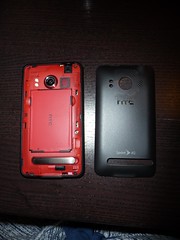
Phone and battery, nice touch with matching battery.
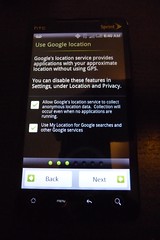
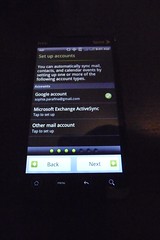
Set up screens for Google location, email, and social media.

Size comparison of devices: iPad, HTC EVO G4, Motorola Droid, iPod Touch, HTC myTouch, Nokia 2610
 |  |
 |  |
 |  |
 |  |  |

Size comparison of devices: iPad, HTC EVO G4, Motorola Droid, iPod Touch, HTC myTouch, Nokia 2610
Sunday, April 25, 2010
Au revoir Dell Mini, bienvenue iPad
It's been mostly fun running OSX on the Dell Mini, but eventually I got tired of using an underpowered system for the type of work that I do. No amount of tweaking could stop the system from crawling to a halt after several hours. Any and all browsers seemed to consume inordinate amounts of memory and sleep became a game of russian roulette that might require multiple safe boots to reset boot caches. Compiling took lots of time and running the Android emulator was glacial. I took to dragging around my old 15" MacBook Pro to get things done, but this defeats the purpose of a lightweight travel machine. It was a great experiment because I learned a lot about OSX even though I had been running it for three years before loading it on the Dell Mini.
The replacement(s) are a MacBook Pro with lots of RAM for running VMs (something the Dell could not do with it's N270 processor) and an iPad. The MBP is a prosaic machine for doing prosaic things. The iPad does what the netbook is intended to do, except far more elegantly. It's a great media machine with an incredible battery life. It is indeed a great device for consuming media, but its also a good device for capturing media and placing it in your personal catalog of information. I use Evernote to grab web pages, images, pdfs, and to take notes. iPads are inherently social, I've shown the iPad to lots of people by handing it to them and letting the play with it, which is something you can't do with a notebook form factor. Watching people interact with the iPad made me realize that it is the future UI for the internet of things.
Wednesday, March 31, 2010
AR Parrot Drone Demo at Where2.0 2010
A little techno-fetishism from Where2.0, the Parrot AR Drone. Experience William Gibson's future past for $1200.
 More photos on Flickr.

Monday, March 29, 2010
Where2.0 and WhereCamp 2010
Where2.0
After deciding to skip Where2.0 and go straight to WhereCamp for 2010, I have to eat my words from twitter describing Where2.0 as, "low signal to noise ratio, unless you count product launches as signal." Since saying that, the Where2.0 program has proven me wrong and is probably one of the best conference schedules I've seen in a while.
I'm really excited by the Where2.0 program and I'm having a tough time deciding which session to attend. I'm happy that all the location based product launches occurred at SXSW, leaving Where2.0 more technically focused this year. Let the marriage of location and real time analytics begin.
That said, I'm also speaking at Where2.0, not once but 3 times. I'm on two augmented reality panels and an Ignite talk.
Convene and lead a panel on requirements and specifications for an open software stack for augmented reality, based on the assumption that AR is both a discrete medium, and it is the intersection of many media, including web, CAD, mapping, games, virtual worlds... Read more.
This panel will discuss shared augmented realities, considering some of the essential possibilities and challenges inherent in this new class of social augmented experiences. The format is presentation and discussion of a small set of scenarios (defined in advance, with audience input) describing likely future forms of shared augmented realities at differing scales of social engagement. Read more.
Tish Shute also has more detailed information on our panel session on her blog ugotade.com.
Times are hard and your angel funder just told you that your non-profit open source org needs to feed itself. Great, but it also means change, in terms of process, organization, culture and people's expectations. The talk is about achieving a balance between profitability and the open source mission.
Since its start in 2007, WhereCamp has taken off with events happening Portland, Denver, Montreal, London, Quebec, and Africa as well as one in the Bay Area following Where2.0. Google is once again hosting WhereCamp for 2010 and over 240 people have signed up for the event. There are mentions of kites, cameras, and computers on twitter and Scoble has favorited WhereCamp. Tish Shute and I are planning a session on the ARWave project which uses the Wave Federation Protocol to deliver augmented reality experiences. There will be camping on the Google grounds promising late night hacking sessions and geo-shenanigans.
Monday, March 22, 2010
Open Source AR Toolkit Roundup (Part 2)
Since the last post on augmented reality toolkits in December, more open source AR projects have been announced. Without further ado here's a new roundup of AR code to play with.
Locatory is based on the Gamaray open source release and developed at the Open University of the Netherlands. The project is hosted on Google Code and can be downloaded here.
Mixare is another augmented reality engine for the Android platform. Mixare is a platform to build on and uses json as a data source, lots of good documentation at mixare.org and the code and documentation hosted on Google and available for download. Mixare based apps are already available in the Android Market Place.
augmentthis! is a server and Android app that let's users upload KML and display them on their Android device. The server portion is available on Google code. The app is available on the Android Market, and the augmenthis! upload service is on Google app spot with some additional documentation.
SLARToolKit brings the venerable ARToolkit code base to Microsoft's SilverLight technology. SLARToolkit can be downloaded from Microsofts open source project hosting site Codeplex.
SLARToolkit - Silverlight Augmented Reality 3D projection sample from Rene Schulte on Vimeo.
Symbian gets its own augmented reality engine with OpenMAR. Source and community for OpenMAR is at their website.
One of the more exciting demos making the rounds around the AR community is the Parrot AR Drone, a quadri-copter controlled by an iPhone. AR Drone has an open API and SDKs for multiple plaforms available on their site.
While the following are not complete augmented reality applications, service API and SDKs that support AR applications are also becoming more common place.
Kooaba for both the iPhone and Android platforms provides mobile image search. While not open source, Kooaba provides a free query API and a commercial data upload API. Integrating image search into AR applications is a first step away from static AR content into fully interactive applicaitons.
SNAP or Sensor Networking Application Platform is an Android toolkit developed by Ericsson Labs that provides a uniform API for accessing sensors on Android devices. Interestingly, they choose to use the Open Geospatial Consortium SensorML specification to encode sensor information, can you say "Internet of things?"
Locatory is based on the Gamaray open source release and developed at the Open University of the Netherlands. The project is hosted on Google Code and can be downloaded here.
Mixare is another augmented reality engine for the Android platform. Mixare is a platform to build on and uses json as a data source, lots of good documentation at mixare.org and the code and documentation hosted on Google and available for download. Mixare based apps are already available in the Android Market Place.
augmentthis! is a server and Android app that let's users upload KML and display them on their Android device. The server portion is available on Google code. The app is available on the Android Market, and the augmenthis! upload service is on Google app spot with some additional documentation.
SLARToolKit brings the venerable ARToolkit code base to Microsoft's SilverLight technology. SLARToolkit can be downloaded from Microsofts open source project hosting site Codeplex.
SLARToolkit - Silverlight Augmented Reality 3D projection sample from Rene Schulte on Vimeo.
Symbian gets its own augmented reality engine with OpenMAR. Source and community for OpenMAR is at their website.
One of the more exciting demos making the rounds around the AR community is the Parrot AR Drone, a quadri-copter controlled by an iPhone. AR Drone has an open API and SDKs for multiple plaforms available on their site.
While the following are not complete augmented reality applications, service API and SDKs that support AR applications are also becoming more common place.
Kooaba for both the iPhone and Android platforms provides mobile image search. While not open source, Kooaba provides a free query API and a commercial data upload API. Integrating image search into AR applications is a first step away from static AR content into fully interactive applicaitons.
SNAP or Sensor Networking Application Platform is an Android toolkit developed by Ericsson Labs that provides a uniform API for accessing sensors on Android devices. Interestingly, they choose to use the Open Geospatial Consortium SensorML specification to encode sensor information, can you say "Internet of things?"
Monday, February 22, 2010
Augmented Reality Meetup Videos
Chris Grayson (@chrisgrayson) set up ARMeetup.org, which is a video hub for Augmented Reality Meetup Groups. The video for the February 17th Augmented Reality New York (#arny) meetup is up and the demo line-up follows:
- Ori Inbar of Ogmento and gamesalfresco.com demos the best and worst AR apps for the iPhone (and his rig for showing apps live on a mobile)
- Mike Kelly of Hudson Union - demos 3D object movies controlled by an AR marker to integrate high resolution print ads into a AR environment
- Chris Grayson of GigantiCo presented on the use of virtual mirrors in retail ecommerce to enhance user experience at point of sale.
Wednesday, February 10, 2010
Dell Mini 9 OSX: How To Install Silverlight
On occasion I feel a need to checkout some web application written in Silverlight. I usually do this on my MacBook Pro but I wanted to be able to do this on the Dell Mini with out seeing this:


The Silverlight installer incorrectly identifies the Intel N270 Atom as a PowerPC chip. Fortunately there is a work around described in the howto below:
- Download Silverlight.
- Open the Silverlight.dmg file and copy Silverlight.3.0.pkg to another directory such as ~/Downloads
- Using terminal remove the InstallationCheck:
sudo rm ~/Downloads/Silverlight.3.0.pkg/Contents/Resources/InstallationCheckAfter that, double click on the SilverLight.3.0.pkg and follow the installation instructions as usual.
Sunday, February 7, 2010
Dell Mini 9 OSX: Improve Performance by Blocking Flash
I'll keep it simple. Turn off Flash in your browser to prevent high CPU usage and browser crashes.
Howto:
Howto:
- Safari: ClickToFlash
- FireFox: Flashblock
- Chrome: FlashBlock (requires version that supports extensions)
Unhappy people at GetSatisfaction and the conflicting statements from Kevin Lynch and Emmy Huang of Adobe about problems with flash.
Friday, February 5, 2010
Mission 4636 and improving the Mechanical Turk
During the days after the earthquake in Haiti, I was traveling and was not able to participate with the ongoing mapping efforts at CrisisCamp. However, I am reasonably fluent in Haitian Creole/Kreyol so I volunteered to translate. I was very happy to discover that Ushahidi had set up a SMS translation service called Mission 4636.

Ushahidi continues to host the chatroom which is the touchpoint for 4636 volunteers. I hope that Crowdflower and Samasource will eventually add a chatroom to supplant the one at Ushahidi and continue to foster the collaborative environment. Volunteers are still needed at Mission 4636. If you are a Francophone or Kreyol speaker, or if you just want to help, you can register at Samasource.
Mission 4636 is the ongoing effort to collect and translate SMS messages from Haitians and route their requests to responders on the ground. Mission 4636 started at Ushahidi and moved to CrowdFlower with Samasource for long term support. At this time, Mission 4636 relies on volunteers to provide the translation and geolocation services. Samasource provides the following graphic describing Mission 4636:

source: (Samasource: http://www.samasource.org/haiti/)
The system is essentially a mechanical turk with volunteers performing the translation and extracting coordinate information based on references to addresses or more general locations in the text of the message. Volunteers at CrisisCamps quickly mapped Haiti in OpenStreet Map and and other contributers created the Haiti Crisis Map which is helpful for finding the coordinates of locations in latitude and longitude.
While tools such as the Haiti Crisis Map are important, it is the volunteer translators that make the system work. For example, I translated a text with the address of Ri 3, Fre Rigo Okay to Rue 3, Freres Rigaud, Les Cayes, which is the French label on the map. Haitian Kreyol is more of a spoken language with a loose orthography and has a tendency towards being a phonetic language. Having lived near Les Cayes, I knew that it was called Okay in Kreyol, which was helpful for knowing where to look in the first place. Similarly, there were many requests from Delmas, an area in Port-au-Prince, that required local knowledge to find the precise location of the person sending the SMS. Finding the coordinates of these locations to accurately direct responders on the ground depends heavily on local knowledge that can not be derived from the map.
Ushahidi created a chatroom for volunteers which was instrumental for tapping into and sharing local knowledge. Having a place to interactively discuss location and provide assistance for translating the SMS greatly improved the translations and the accuracy of the location coordinates. Being able to work collaboratively with others made the information in the SMS actionable and facilitate the work being done in country.
The importance of collaboration is highlighted in a recent article in the New York Review of Books by the chess grand master Gary Kasparov. In the article, he describes a free style chess tournament where players could compete in teams and use computers. Chess playing computers essentially brute force solutions to win, but typically they cannot defeat a strong human player. It was expected that a strong human player (professional) with a powerful computer would be the logical winner of the tournament. The winner(s) were a pair of amateur players that collaborated using three consumer grade computers. Kasparov describes the outcome as surprising:
"The surprise came at the conclusion of the event. The winner was revealed to be not a grandmaster with a state-of-the-art PC but a pair of amateur American chess players using three computers at the same time. Their skill at manipulating and "coaching" their computers to look very deeply into positions effectively counteracted the superior chess understanding of their grandmaster opponents and the greater computational power of other participants. Weak human + machine + better process was superior to a strong computer alone and, more remarkably, superior to a strong human + machine + inferior process."My experience with Mission 4636 validates that a combination of humans of varying skill levels + machine mediated interaction and tools + better process produces better results than having volunteers simply performing translations without the benefit of a collaborative approach. While a mechanical turk system can harness the efforts of volunteers distributed globally, the addition of an adhoc method of collaboration greatly increased the efficacy of the system.
Ushahidi continues to host the chatroom which is the touchpoint for 4636 volunteers. I hope that Crowdflower and Samasource will eventually add a chatroom to supplant the one at Ushahidi and continue to foster the collaborative environment. Volunteers are still needed at Mission 4636. If you are a Francophone or Kreyol speaker, or if you just want to help, you can register at Samasource.
Subscribe to:
Posts (Atom)
